This topic walks you through the new features and enhancements in the following releases of erwin Data Intelligence (erwin DI).
erwin DI 15.0 has the following new features and enhancements:
New Features
The features introduced in this release are:
Enhancements
The enhancements implemented in this release are:
New Features
The following sections walk you through a brief description of the new features and wherever relevant, a reference to more information.
Discover Assets: Enhanced Dashboard and Configuration Options
erwin DI 15.0 now has a redesigned Discover Assets dashboard with an organized layout and improved usability. It enables you to easily access asset information and manage them intuitively. For more information, refer to the Discover Assets topic.
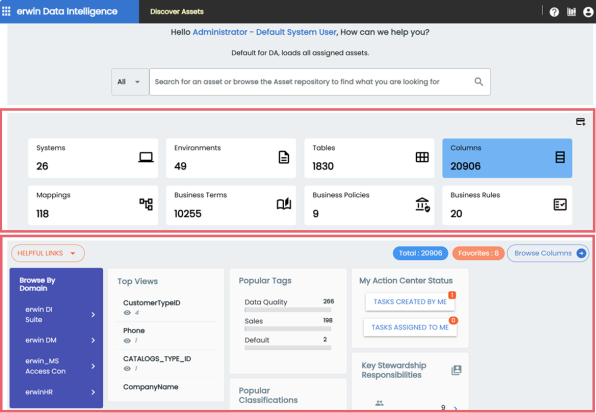
You can enable the customized dashboard via Discover Asset Settings and Profiles in the Resource Manager.
-
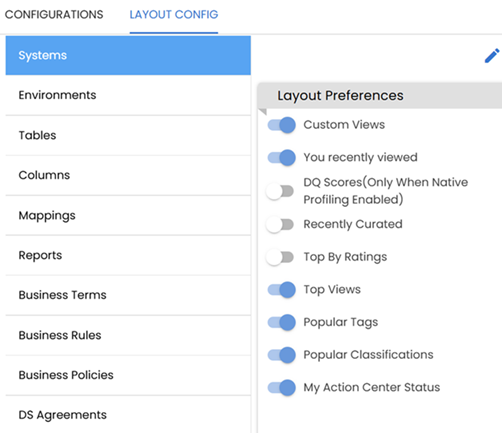
The Layout Config tab has been added to the Discover Asset Settings page. It enables you to configure the layout preferences for each asset type on the Discover Assets dashboard. For more information, refer to the Configuring Discover Assets topic.
-
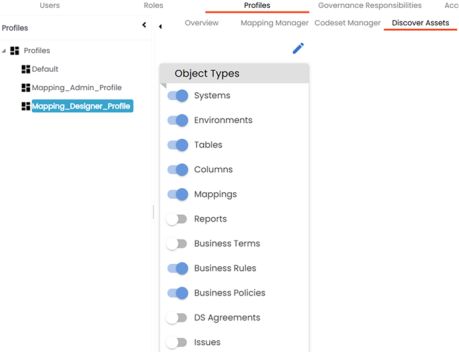
The Discover Assets tab has been added to the Profiles page of the Resource Manager module. It enables you to configure the asset types available for each profile. You can then select the profile on the Discover Assets dashboard to view the configured asset types. For more information, refer to the Setting Object Types for Profiles topic.
Maturity Level Certification
erwin DI 15.0 now introduces the Maturity Level Certification to validate whether the AI models and other data marketplace assets and business assets fit the purpose and comply with regulations. This certification enables automated validation based on seven key criteria.
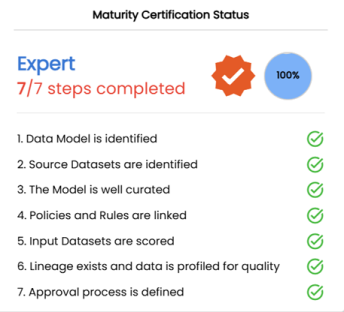
You can enable and configure this certification via the Business Glossary Manager & Data Marketplace Settings page. For more information, refer to Configuring Maturity Level Certification.
My Action Center
erwin DI 15.0 introduces several enhancements to the My Action Center module to improve task configuration, visibility, and usability.
-
The My Action Center dashboard now includes two options, My Tasks (
 ) and All Tasks (
 ). You can switch between these options to view tasks that are created by or assigned to you or to see all tasks.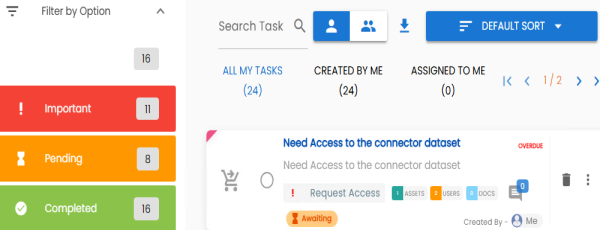
-
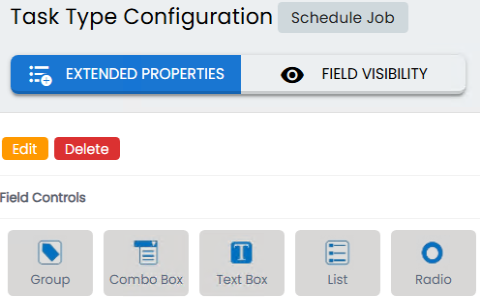
The Task Type Configuration page now includes two new tabs, Extended Properties and Field Visibility.
-
Extended Properties: Using this tab, you can now configure task types by adding different field types and setting field-level properties.
-
Field Visibility: Using this tab, you can now control which fields are visible to users based on their assigned roles or task types.
For more information, refer to the Configuring Task Types topic.
-
Restore, Re-add, or Purge Invalid Tables and Columns
erwin DI 15.0 introduces a new capability that enables you to manage tables and columns that are in an invalid state.
You can now:
-
Restore invalid tables and columns to make them active again.
-
Re-add by deleting the invalid tables and columns and adding them as new assets.
-
Purge invalid tables and columns to permanently remove them from the database.
For more information, refer to the Restoring, Re-adding, or Purging Tables and Columns topic.
Enhancements
The following sections walk you through a brief description of the enhancements and wherever relevant, a reference to more information.
Enhanced Metadata Scan Import Options
erwin DI 15.0 adds enhanced import options for scanning metadata from MS Excel, JSON, CSV, XMI, XSD, and MS Access files. These options offer more precise control over metadata integration and management within the environment. For more information, refer to the Scanning Metadata topic.
Productivity and UI Enhancements
Reject Proposed Assets
An option to reject proposed business and data marketplace assets has been added. You can edit and resubmit rejected assets for approval.
Snowflake OAuth Authentication Support
You can now configure OAuth authentication for Snowflake environments. An option, OAuth, has been added to the Authentication Type field when setting up a Snowflake environment. For more information, refer to the OAuth Authentication topic.
Extended Data Value Scoring
Six new scoring parameters have been added to calculate the data value score for business and data marketplace assets.
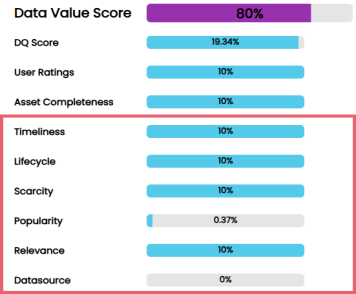
For more information, refer to the Configuring Data Value Score topic.
Import Indexes
You can now harvest indexes when scanning metadata from SQL Server, Oracle, and MySQL databases. An option, Import Indexes, is available under the Import Metadata Options. For more information, refer to the Scanning Metadata topic.
Include Indexes and Valid Values
You can now include Indexes and Valid Values when importing and exporting environments. These options are also available when scheduling IDR jobs to sync metadata to erwin DI Cloud using the Instance Data Replication (IDR) configuration. For more information, refer to the Managing Environment and erwin DI Cloud Configuration topics.
Discover Assets: UI Enhancements
You can now quickly access relevant assets and related information using the following options:
-
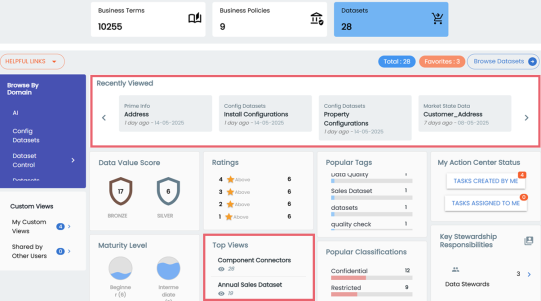
Browse Recently Viewed and Top Viewed Assets
The Discover Assets module now captures view and click counts for all assets. This enhancement enables two new options:
-
Recently Viewed: Displays assets viewed most recently.
-
Top Views: Displays the most frequently viewed assets.
-
-
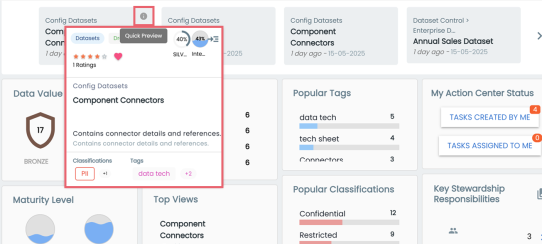
Preview Key Asset Information
-
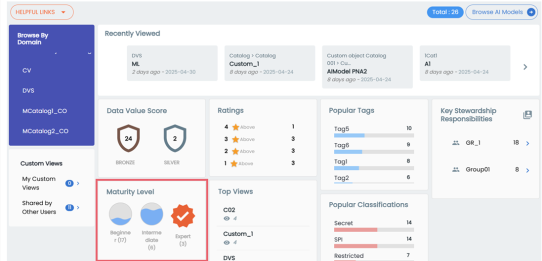
Browse and Filter by Maturity Levels
You can now browse business and data marketplace assets by their maturity levels directly from the Discover Assets dashboard.
A new preview option is available when you hover over the asset and click  . This feature highlights key metadata information.
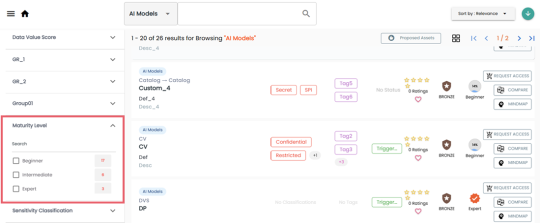
You can also filter assets by their maturity levels in both the list and grid views of the Discover Assets module.
For more information, refer to the Searching and Filtering topic.
erwin DI 15.1 has the following new features:
New Features
The features introduced in this release are:
New Features
The following sections walk you through a brief description of the new features and wherever relevant, a reference to more information.
erwinAI Bot
erwinAI is a generative AI bot that instantly and automatically generates definitions for undefined business terms and classifications for unclassified columns. After results are generated, you can evaluate them and choose to submit or regenerate—maintaining a human-in-the-loop workflow.
For improving productivity, it enables you to:
-
Use suggested prompts or enter custom ones.
-
Evaluate and regenerate results before final submission.
This capability is available in the following key modules:
-
Discover Assets
-
Metadata Manager
-
Business Glossary Manager
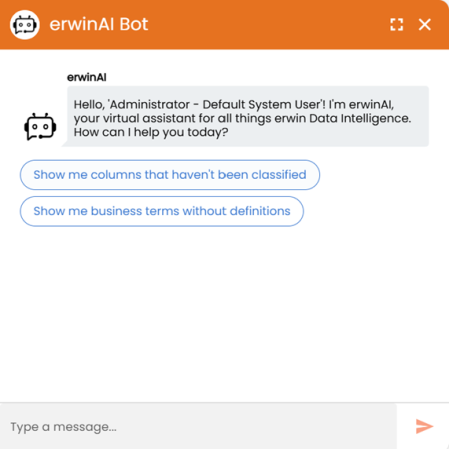
For more information, refer to the erwinAI Bot and Configuring erwinAI topics.
Data Profiling Configuration Enhancement
A new field, DQ Version, has been added under the Data Profiling Configuration tab. This field displays the version of erwin Data Quality integrated with your DI instance. It enables you to verify compatibility and manage profiling configurations more effectively. For more information, refer to the Enabling DQLabs section.
erwin DI supports DQ 3.x.

Language Preference and Password Change Support
Settings to change the language preference and password are enabled for BU users. You can find these settings under My Settings profile options.
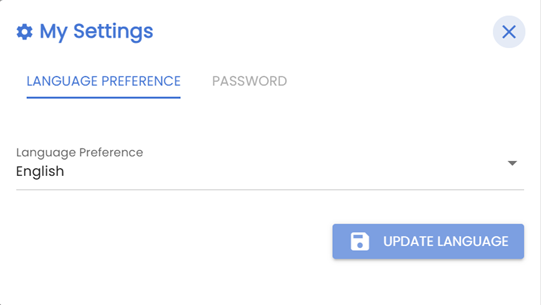
For more information, refer to the User Interface topic.
erwin DI 15.2 has the following new features and enhancements:
New Features
The features introduced in this release are:
Enhancements
The enhancements implemented in this release are:
New Features
The following sections walk you through a brief description of the new features and wherever relevant, a reference to more information.
erwinAI Assistant
erwinAI Assistant introduces enhanced capabilities to help you generate and moderate attributes for business assets, including definitions, descriptions, notes, tags, and SDI classifications. You can enter a prompt, review the results, and accept or moderate them to ensure accuracy and consistency.
This release builds on earlier functionality with expanded capabilities, improved automation, and an enhanced workflow that includes a review step for precision. You can access erwinAI Assistant in the Business Glossary Manager, Discover Assets, Metadata Manager, and Data Marketplace modules.
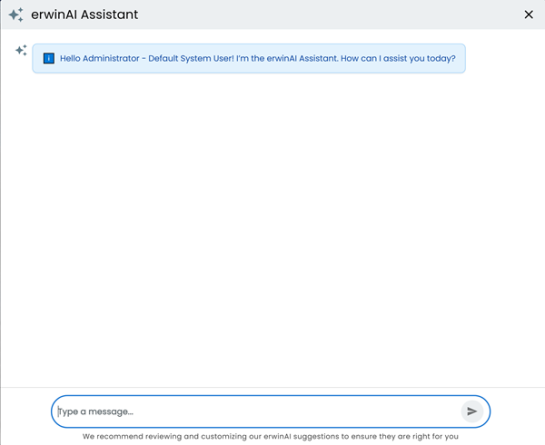
For more information, refer to the Using erwinAI Assistant topic.
erwinAI Inline Assist
erwinAI Inline Assist integrates generative AI into Business Glossary Manager, Metadata Manager, and Data Marketplace for fast inline enrichment of asset details. It reduces manual effort and improve accuracy, completeness, and overall data value. It generates content for fields, such as Definition, Description, Notes, Logical Name, Comments, SDI Classification, and Tags across business assets, marketplace assets, tables and columns.
erwinAI Smart Query Assist
erwinAI Smart Query Assist introduces a simpler and conversational way of searching and filtering assets in the Discover Assets module. It enables you to use natural language to search assets making the process faster and intuitive.
With erwinAI Smart Query Assist, instead of searching for a keyword and applying multiple filters manually, you can interact conversationally to find what you need.
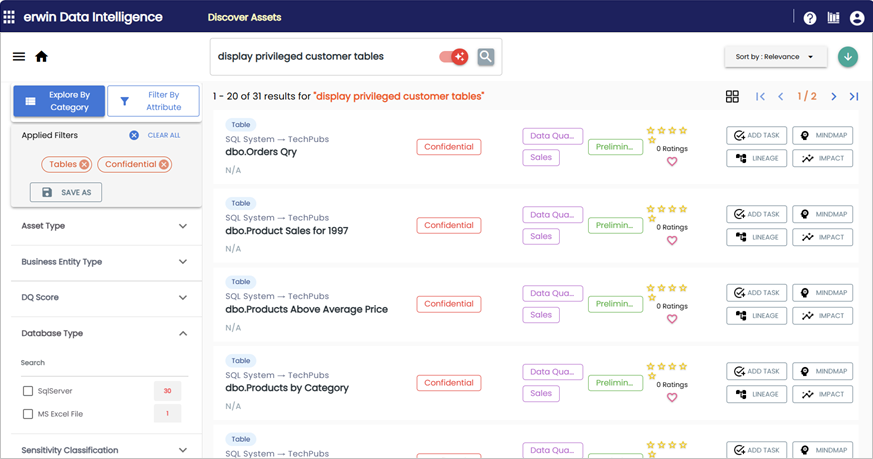
For more information, refer to the Searching and Filtering topic.
Enhancements
The following sections walk you through a brief description of the enhancements and wherever relevant, a reference to more information.
Support for Mapping Views
erwin DI now supports mapping View assets to corresponding Views in erwin Data Quality. Previously, asset mapping included Environments to Catalogs, Tables to Datasets, and Columns to Attributes. This enhancement extends support to Views, ensuring comprehensive coverage of data assets and improving lineage, governance, and quality checks.
For more information, refer to the Data Quality topic.
Enhanced Connection Identification
erwin DI now generates unique connection names in erwin Data Quality using the format SystemName_EnvironmentName to prevent conflicts and ensure reliable data profiling.
Enhanced Unstructured Data Support
erwin DI introduces support for unstructured data to enhance metadata management and governance. It enables automated metadata ingestion and classification of the unstructured data in the following file formats:
- Document Formats: PDF, Word (DOC/DOCX), Excel (XLS/XLSX), Text (TXT), RDF, PPT, HTML, and Markdown.
- Media/Binary Formats: PNG, JPG/JPEG, GIF, BMP, and TIFF.
For more information, refer to the Enhanced Unstructured Data Support topic.